Cheese recipe catalog from the website
The "Recipes" («Рецепты») tab on the main page of
Cheesemaking mode opens this page - the samovar-tool.ru cheese recipe catalog, with a preview and the ability to apply a program right in the browser, without saving a file to your computer.
Catalog
There are three recipe sources: "Main" («Основные»), "User" («Пользовательские») and "Mine" («Мои») (buttons above the list). For the "Mine" source, a Blynk token must be set in the device settings - otherwise the message "A Blynk token is not set in the device for the "Mine" list." («Для списка «Мои» в устройстве не задан токен Blynk.») is shown, and the filters become unavailable: only searching by name among the already loaded recipes works.
For "Main" and "User", search by name and filters are available: cheese family, style, country, milk type, difficulty. The recipe list is paged; the "Back" («Назад») and "Forward" («Вперёд») buttons switch pages.
The "Open CheeseXML" («Открыть CheeseXML») button next to the search loads a recipe from a local .xml file on your computer - it works the same way as choosing a recipe from the catalog, except that the source shown in the preview panel is "Local CheeseXML" («Локальный CheeseXML»).
Cheese recipe catalog on the "Recipes" («Рецепты») page
 Recipe source"Main" («Основные»), "User" («Пользовательские») or "Mine" («Мои») ("Mine" requires the Blynk token set in the device settings).
|
 Search and filtersSearch by name and filters: cheese family, style, country, milk type, difficulty. Filters are unavailable for the "Mine" source.
|
 Open CheeseXMLLoads a recipe from a local .xml file on your computer instead of from the website catalog.
|
 Recipe listClicking a recipe loads it into the program preview panel.
|
 Paged listSwitch list pages with the "Back" («Назад») / "Forward" («Вперёд») buttons.
|
Program preview
Clicking a recipe in the list (or loading a local file) opens it in the right panel: name, source, number of stages. If the recipe has a stage with a temperature range instead of a fixed value, a field for choosing one value from that range appears above the "Convert" («Преобразовать») button - without it, conversion is not possible ("Stage "…": choose one temperature value from the range." («Этап «…»: выберите одно значение температуры из диапазона.»)).
The "Convert" («Преобразовать») button builds a Samovar program from the recipe stages and shows it in a read-only text field, together with a list of warnings. For example: stages that the automation cannot perform (adding the starter culture by hand, cutting the curd, and so on) become manual actions with the message "Stage "…" is not supported by the automation and was converted to a manual action." («Этап «…» не поддерживается автоматикой и преобразован в ручное действие.»); ripening stages are not included in the program ("Ripening stages are excluded from the Samovar program." («Стадии созревания исключены из программы Самовара.»)); if the stage timeout cannot be taken from the recipe, Samovar substitutes its own - a warning is shown about that too. A program cannot be longer than 30 stages - if it is, the message "The program has more than 30 stages; applying is unavailable." («В программе больше 30 этапов; применение недоступно.») is shown, and the program cannot be applied.
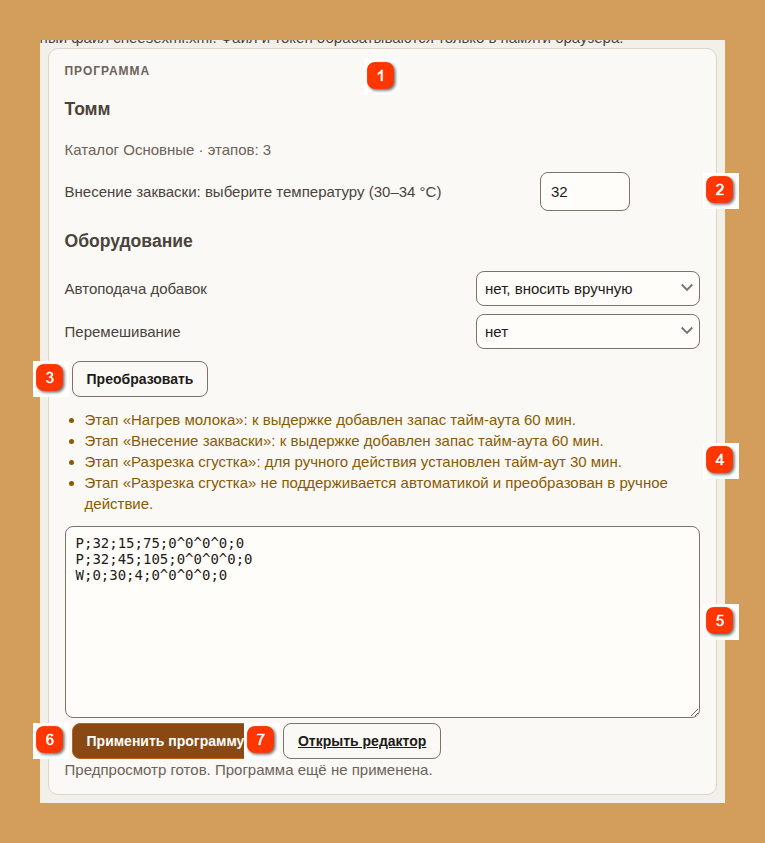
Program preview: choosing a temperature from a range, conversion and warnings
RecipeName, source (catalog, "My recipe" («Мой рецепт») or "Local CheeseXML" («Локальный CheeseXML»)) and number of stages.
|
Temperature choiceFor stages with a temperature range instead of a fixed value, you must choose one value from the range.
|
ConvertBuilds a Samovar program from the recipe stages.
|
WarningsFor example, which stages became manual actions and where the default timeout was substituted.
|
Program previewThe finished program lines, view only. No more than 30 stages.
|
 Apply programAvailable only in "Cheese" («Сыр») mode; sends the program to the device without starting the cheesemaking run.
|
 Open editorGoes to the "Program" («Программа») tab of Cheesemaking mode, where you can refine and save the program.
|
The "Apply program" («Применить программу») button sends the finished program to Samovar's memory - the same as "Set program" («Установить программу») on the "Program" («Программа») tab of Cheesemaking mode, without starting the cheesemaking run ("The program was accepted by the device. It was not started." («Программа принята устройством. Запуск не выполнялся.»)). The button is available only while Samovar is in "Cheese" («Сыр») mode and the conversion finished without blocking errors; otherwise one of these messages is shown under the buttons: "To apply, switch Samovar to "Cheese" mode." («Для применения переключите Самовар в режим «Сыр».») or "The conversion cannot be applied." («Преобразование нельзя применить.»).
The "Open editor" («Открыть редактор») link leads to the main page of Cheesemaking mode (the "Program" («Программа») tab), where you can view the applied program, refine it and save it in the usual way - see
Cheesemaking program.


